Blog

  • Async Test Sources in NUnit

    NUnit has long supported the definition of test cases in numerous forms, including via inline primitive data via the TestCaseAttribute or potentially more complex data returned from a method, property, or other source at runtime via TestCaseSourceAttribute. The latter has typically only supported synchronous methods. This complicated defining data-driven test cases where an internal operation required calling a Task-based API. A common example of this could be a test case which reads from a JSON source file or other stream using a method like JsonSerializer.DeserializeAsync().

    In the past this would mean an awkward and unnatural call using something like .GetAwaiter().GetResult():

    public class Tests
    {
        [TestCaseSource(nameof(MyMethod))]
        public void Test1(MyClass item)
        {
        }
    
        public static IEnumerable<MyClass> MyMethod()
        {
            using var file = File.OpenRead("Path/To/data.json");
            var t = JsonSerializer.DeserializeAsync<IEnumerable<MyClass>>(file).AsTask();
    
            return t.GetAwaiter().GetResult();
        }
    }
    

    NUnit 3.14 was released a few months ago and included support for “async” or task-based test case sources. Now a TestCaseSource can target a Task-returning method to allow for much more natural code:

    public class Tests
    {
        [TestCaseSource(nameof(MyMethodAsync))]
        public void Test1Async(MyClass item)
        {
        }
    
        public static async Task<IEnumerable<MyClass>> MyMethodAsync()
        {
            using var file = File.OpenRead("Path/To/data.json");
            return await JsonSerializer.DeserializeAsync<IEnumerable<MyClass>>(file);
        }
    }
    

    The above example focuses on Task, but any awaitable type such as ValueTask or a custom awaitable also works. Other “source” attributes such as TestFixtureSource or ValueSource are supported as well.

  • Creating a Grunt plugin on Windows in MINGW

    I’ve been working with grunt a bit lately, and have found the need for a task that there doesn’t seem to be in the expansive list of existing plugins. So I thought I’d create my own. Fortunately, grunt has a great and simple page on doing this (http://gruntjs.com/creating-plugins).

    Unfortunately, I ran into some issues.

    I usually like to work in the Git Bash shell that comes with MINGW. Trouble is, this was causing some pathing issues. Specifically, with these two commands:

    1. Install the gruntplugin template with git clone git://github.com/gruntjs/grunt-init-gruntplugin.git ~/.grunt-init/gruntplugin(%USERPROFILE%\.grunt-init\gruntplugin on Windows).
    2. Run grunt-init gruntplugin in an empty directory.

    Apparently MINGW, or at least my version, has some issues resolving %USERPROFILE%. So I ended up with a cloned git repo in my local directory called %USERPROFILE%.grunt-initgruntplugin. After fixing that and moving it to my root user profile I kept geting an “EINVAL” issue on the next command. I figured this had to be a pathing issue too. So I dropped out of MINGW into a cmd shell by typing cmd. Except that didn’t quite do it. Maybe MINGW was intercepting input and filtering it in an unexpected way, but my problems became even worse. So my fix?:

    1. Add git to your OS Path variable (C:\Program Files\Git\bin)
    2. Run a regular command shell (cmd outside of MINGW)

    With those two small changes, everything worked flawlessly.

  • Determining the version of MINGW

    As a Windows developer who uses git and gcc, I found it easiest to install MINGW to help work in a console (Git Bash here is a fantastic shell extension!). Unfortunately, it’s been a while since I installed it and I forget the version I’m using. After a bit of googling, it seems someone figured out years ago how to figure this out in a shell script (stahta01)

    http://forums.codeblocks.org/index.php?topic=9054.0

    Just so I don’t have to go searching again for it, I’ve copied his/her script and included it below:

    @echo off
    REM version-of-mingw.bat
    REM credit to Peter Ward work in ReactOS Build Environment RosBE.cmd it gave me a starting point that I edited.
    ::
    :: Display the current version of GCC, ld, make and others.
    ::
    
    REM %CD% works in Windows XP, not sure when it was added to Windows
    set MINGWBASEDIR=C:\MinGW
    REM set MINGWBASEDIR=%CD%
    ECHO MINGWBASEDIR=%MINGWBASEDIR%
    SET PATH=%MINGWBASEDIR%\bin;%SystemRoot%\system32
    if exist %MINGWBASEDIR%\bin\gcc.exe (gcc -v 2>&1 | find "gcc version")
    REM if exist %MINGWBASEDIR%\bin\gcc.exe gcc -print-search-dirs
    if exist %MINGWBASEDIR%\bin\c++.exe (c++ -v 2>&1 | find "gcc version")
    if exist %MINGWBASEDIR%\bin\gcc-sjlj.exe (gcc-sjlj.exe -v 2>&1 | find "gcc version")
    if exist %MINGWBASEDIR%\bin\gcc-dw2.exe (gcc-dw2.exe -v 2>&1 | find "gcc version")
    if exist %MINGWBASEDIR%\bin\gdb.exe (gdb.exe -v | find "GNU gdb")
    if exist %MINGWBASEDIR%\bin\nasm.exe (nasm -v)
    if exist %MINGWBASEDIR%\bin\ld.exe (ld -v)
    if exist %MINGWBASEDIR%\bin\windres.exe (windres --version | find "GNU windres")
    if exist %MINGWBASEDIR%\bin\dlltool.exe (dlltool --version | find "GNU dlltool")
    if exist %MINGWBASEDIR%\bin\pexports.exe (pexports | find "PExports" )
    if exist %MINGWBASEDIR%\bin\mingw32-make.exe (mingw32-make -v | find "GNU Make")
    if exist %MINGWBASEDIR%\bin\make.exe (ECHO It is not recommended to have make.exe in mingw/bin)
    REM ECHO "The minGW runtime version is the same as __MINGW32_VERSION"
    if exist "%MINGWBASEDIR%\include\_mingw.h" (type "%MINGWBASEDIR%\include\_mingw.h" | find "__MINGW32_VERSION" | find "#define")
    if exist "%MINGWBASEDIR%\include\w32api.h" (type "%MINGWBASEDIR%\include\w32api.h" | find "__W32API_VERSION")
    
    :_end
    PAUSE
    

    On my machine, it outputs exactly what I needed:

    MINGWBASEDIR=C:\MinGW
    gcc version 4.8.1 (GCC) 
    gcc version 4.8.1 (GCC) 
    GNU gdb (GDB) 7.6.1
    GNU ld (GNU Binutils) 2.24
    GNU windres (GNU Binutils) 2.24
    GNU dlltool (GNU Binutils) 2.24
    GNU Make 3.82.90
    #define __MINGW32_VERSION           3.20
    #define __W32API_VERSION 3.17
    Press any key to continue . . . 
    
  • Nod of the hat to integrating Popcorn js and BBB (Big Blue Button)

    It looks like a few people have been hitting my blog trying to find information on integrating Popcorn.js and Big Blue Button. I thought I’d take the opportunity to give a nod of the hat to a colleague, dseif, for his recent contribution towards making this possible at Hackanooga.

    THIS LINK has all the cool details.

  • Online and on Popcorn Parsing

    After a hiatus from the internet that seemed far longer than the month it actually was, I’m back online.

    I’m looking to continue my work on popcorn.js’s parser support, specifically with cleanup and adding styling support. After a refactoring and code preparation for what is to come, I’m ready and read up enough to begin. Of the three parsers in popcorn.js which support in-spec styles, I’ve decided to focus on the TTML parser over the other leading candidate for a first convert, SSA/ASS.

    As with all the parser styling support, this will be a task of mapping the spec styles to CSS. While the TTML spec is significantly (read: magnitude of 10) larger than the SSA/ASS spec, it should be easier because the style names and behaviours are so similar to what I have to work with in the browser (JavaScript and CSS). In fact, near the beginning of the TTML spec Styling section, the W3C advises:

    In particular since [CSS2] is a subset of this model, a CSS processor may be used for the features that the models have in common.

    That’s perfect! TTML is an XML-based format, so parsing is already made easier by JavaScript’s XML and DOM facilities. This means that after extracting what I need to, I can minimize the work involved with mapping and validating style names and attributes, instead passing them through to the browser for validation and processing. It’s not all easy, however. Some extra rules will need to validated, such as style inheritance from other styles, invalid/inaccessible inheritance, and ensuring styles are applied to the appropriate elements.

    I’ve already started by parsing some basic region and style data (TTML’s equivalent to CSS classes), and structuring some unit tests. What remains at this point is extracting inline styles, and applying all styles to the displayed text. And, of course, validation rules, further unit tests, demos, and tackling any as-of-yet-unforeseen issues. It’s already looking to be a fun, wild project.

    Look for further developments!

  • Combining Git Commits: Git Squash

    I often work by committing small, incrementally stable portions of my work to my working branch, then pushing the entire thing when it’s done. While great for working, this makes for a very cluttered commit history. Not only that, but it also makes it more difficult for peer reviewers to know what changes you’re trying to commit and contribute. To address this, I did the lazy (yet ironically more work) step of making a copy of my files, making a clean working branch, and applying my accumulation of changes in one copy-paste operation. In other words, I was manually squashing my many commits into one.

    Turns out git has this capacity built in. I knew of it, but I never bothered to look into it. Turns out, it was simple, and could’ve saved me a lot of time. This blog post outlines the process:

    git rebase -i HEAD~4

    With that command to begin interactively picking and squashing the last 4 commits. This is done by changing the commit log from picking the last four commits separately to squashing three onto the most recent. So in the interactive editor, this:

    pick 01d1124 Adding license
    pick 6340aaa Moving license into its own file
    pick ebfd367 Jekyll has become self-aware.
    pick 30e0ccb Changed the tagline in the binary, too.

    Becomes this:

    pick 01d1124 Adding license
    squash 6340aaa Moving license into its own file
    squash ebfd367 Jekyll has become self-aware.
    squash 30e0ccb Changed the tagline in the binary, too.

    Just save that, adjust the rebased commit message, and all is well.

  • Re-learning JavaScript OOP well

    It’s been a while since I’ve done some more serious JavaScript development, and even then it was typically very procedural. With adding version-dependent features for Popcorn’s SSA/ASS subtitle parser, I figured this would be a good opportunity to learn. I remember from the past that JavaScript uses Prototypical Inheritance, something I have no experience with in other languages. Luckily, I didn’t have to go far to find some helpful resources.

    In fact, MDN has an article with everything I needed to know, with a lecture by Douglas Crockford filling in the gaps.

    Inheritance and working off the prototype are what I’ve struggled with most, so I’m including some code snippets below. Most are inspired or outright copied and adapted from the MDN article. It’s also on pastebin.

    // Define a constructor for an 'SSAParser' object
    function SSAParser(text) {
      this.text = text;
      this.lines = [];
    }
    
    // Define a function for our parser object. So that memory is only allocated for it once across many objects, we put it on the prototype.
    // Inside the prototype, 'this' refers to the instance object
    SSAParser.prototype = {
      parse: function() {
        return "SSA parser: " + this.text;
      },
    
      getName: function() {
        return "SSA parser";
      }
    };
    
    // Instantiate with 'new' so that the properties are put on a new object (called 'this' in the constructor)
    var parser = new SSAParser("1");
    var parsed = parser.parse();
    
    // Not using 'new' will cause it to be like a normal function call.
    // The result will have 'this' point to the function itself, causing unpleasantness
    var parser = SSAParser("1");
    
    try {
      var parsed = parser.parse();  // SSAParser doesn't return a value, so 'var parser' is undefined, causing an error
    } catch (e) { alert("Please use 'new'"); }
    
    // Being clever, we can avoid using 'new' by always calling the function directly, and explicitly specifying 'this' to be our parser object. This results in far more typing.
    var parser = {};
    SSAParser.call( parser, text );
    var parsed = SSAParser.prototype.parse.call(parser);
    
    // Everything on the prototype is publicly accessible
    // Using closures, we can adapt the above method to have hidden helper functions that aren't publicly accessible
    SSAParser.prototype.useHelper = (function (){
      // This function is defined once, but is not directly on the prototype.
      // It is not publicly visible, but as it's defined in the same closure as a function on the prototype, it is accessible
      // 'this' points to the 'getHelperText' function by default, unless we override it
      function getHelperText() {
        return "From hidden helper: " + this.text;
      }
    
      // This function ends up on the prototype, we can access 'this' properly from within it
      return function() {
        var text = "From helper: " + this.text;
    
        // We can call getHelperText and reference our instance members within.
        // It becomes a private member function
        text += getHelperText.call(this);
        return this.text;
      }
    })();
    
    // Inheritance, ASSParser extends SSAParser
    function ASSParser(text) {
      // Explicitly call parent constructor
      SSAParser.call( this, text );
    }
    
    // We set the prototype to be our base class and update the constructor
    ASSParser.prototype = new SSAParser();
    ASSParser.prototype.constructor = SSAParser;
    
    // Override parent definition of getName
    // Unless we store the old definition of 'getName' we can no longer call the parent version
    ASSParser.prototype.getName = function() {
        return "ASS parser";
    }
    
    // Define new function, which references parent
    ASSParser.prototype.getPi = function() {
        return Math.PI;
    }
    
    var parser = new ASSParser("sample");
    alert(parser.getName());
    alert(parser.getPi());
  • Subtitle Parsing: Planning for Maintainability

    While other commitments have kept me from contributing a lot of code to Popcorn.js in recent months, I’ve had plenty of time think about how to tackle a group of related tickets assigned to me. Approximately a year ago, for Popcorn version 0.3 and 0.4, I was responsible for incorporating some earlier subtitle parsing into popcorn. That grew into Popcorn supporting text display for 7 standardized subtitle formats. 5 of these formats also include their own in-source formatting, each with their own syntax. They grouped into two main classifications:

    XML-based

    • TTXT Format
    • TTML Format

    Text-based

    • WebVTT
    • Sub-Station Alpha (SSA)
    • Advanced Sub-Station (ASS)

    With five different ways to represent the same information, I plan to avoid duplication as much as possible. When done properly, this not only makes it easier to initially develop, but makes future maintenance and improvements simpler. A real example of why this is useful is that in May/June 2011 I had a nearly-complete initial version of a WebVTT parser, with just a few CSS-related quirks to work out. After having put it down for a bit, the standard evolved such that much of what I had done was obsolete. Since it wasn’t modular, most of it has been discarded into a file on my desktop.

    Looking forward, I see two independent cases for code maintenance: format evolution and CSS evolution. Similar domain problems have been solved by translating the source (raw subtitles) into a universal intermediary language, or a machine interpretation, which then gets processed and output. Human language translation has been approached like this, as have cross-platform programming languages. Both Java and .NET compile to an intermediary language (called bytecode and MSIL respectively), which then is translated to the desired, platform-specific output at runtime. While there is a very small overhead with a second translation, it has been said by a Microsoft engineer that maintainability increases drastically.

    Essentially, given n input formats and m output formats, an intermediate level causes their to be n + m + 1 possible combinations, rather than n x m.

    Translation Count
    Translation Count

    Strengthening the argument for this approach is that certain common display functionality (CSS class lookups, creation, etc.) will be required by multiple parsers, and changes must be reflected in all parsers. It is with this knowledge that I plan to stand on the shoulders of giants.

  • InnerHTML vs. DOM Manipulation Part 2 (IE9 Edition)

    A while ago I researched some of the differences in modifying the structure of an HTML document using innerHTML or the DOM. The summary at that time was that, while using innerHTML means less code, most modern browsers provide negligible differences in execution time. That is, of course, provided you minimize modifications to the active document (web page) directly, as each will potentially cause a redraw operation. The bottom line was that it was personal preference, with a tradeoff on less code or more standards-adherence and reliability.

    There is an epilogue to this story:

    My personal preference is to using standards for cross-browser reliability. Unless file size is a concern (low-bandwidth networks) or large scale input modifications are needed (re-creating large portions of a document programmatically), working with the DOM directly is easier in the long run. It seems the output of innerHTML can vary across browsers, depending on the node structure underneath. This can make comparing DOM structure (unit tests, for example) by innerHTML difficult to get right cross-browser. Where as most browsers will concatenate nodes together without a space (<div><span></span></div>), IE seems to in some/most instances use spaces between nodes on output: (<div> <span> </span> </div>).

    While this may seem an edge case, it’s one more argument to be mindful of using DOM-standard tools and apis.

  • Test Driving Popcorn on IE10

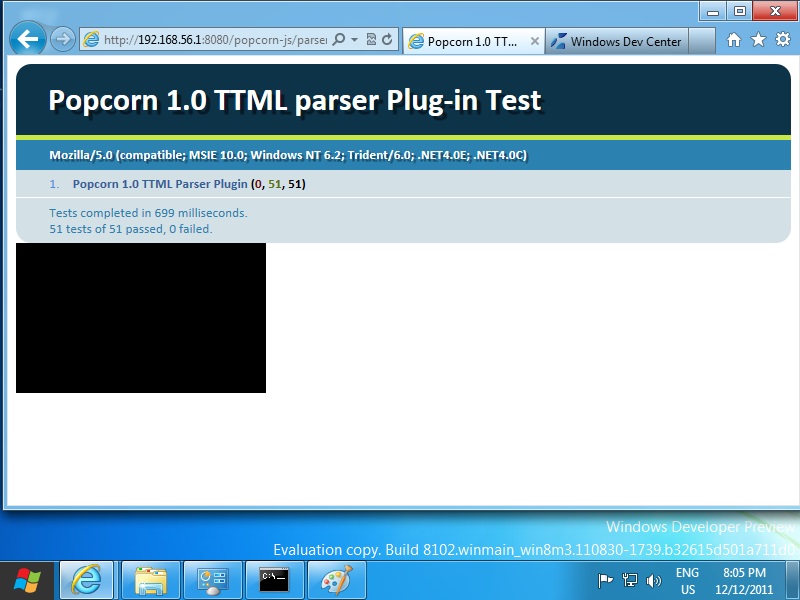
    I’ve been hearing a bit of buzz about IE 10 increasing their support for HTML5 and CSS3, so I thought I’d take Popcorn.js for a whirl on it. VirtualBox made the install process pretty painless, I only had to think for myself once. Since it’s built upon Windows 8, I had to download the developer preview. There were quite a few tutorials on the web outlining the install process (some decrying that certain VMs didn’t work at the time), but VirtualBox seemed the most tried and true. In fact, between the time those articles were written and I tried this, newer VirtualBox versions had been created with special “Windows 8” configuration setup. I first followed this PCWorld one, but eventually felt comfortable winging it.

    The only hang up I had with it was with hardware-level virtualization. I consistently would receive VM errors when starting up, and ignoring them prompted with with “Windows install error, please reboot” and HAL_INITIALIZATION_FAILED dialogs. Apparently, my processor supported hardware virtualization, and VirtualBox/Windows was trying to use it, but it was disabled in the BIOS. Changing that one thing allows for a clean and easy install.

    Things are quite slow on both my host and guest OS’s right now, but I guess that can be expected with only 3 GB to run both, plus VirtualBox, Apache, Firefox and IE. Popcorn itself performed quite well, especially considering the pre-beta nature of Win8 and IE10 and the aforementioned memory constraints.

    I was able to test with minimal effort, as my host OS has Apache setup on it, and Win8 is configured to connect to the network through it (the host OS) using NAT. All I had to do is, on Win8, enter the IP address of my host OS, followed by the port I run Apache on, and I can run everything I need remotely.